Traveling to a destination can be exciting, but planning is often frustrating. Looking for affordable deals, best destination options, and finding the appropriate flight. Bringing all of them together to plan a perfect departure can be exhausting. Do not worry; Google Flight Explorer is your best travel friend that brings the best destination options and compares the prices to get you the best flight deals.
Now, the main question arises: how does the Google Flight Explore help travelers? Well, as the name already suggest you, it acts as the best explorer for the passengers to find the best deals with an acclaimed airline. However, most passengers do not know how to use its features. This guide will help you understand Google Flight Explorer.
How to Use Google Flight Explorer?
Let's categorize travelers into two groups and examine how Explorer can benefit each in different ways.
- Travelers with a destination in mind
- Travelers looking for inspiration
Type 1: So, you already have a destination in mind; half of your job is done. However, Explorer still offers many features to make your travel easier and more convenient. Here's how Google Flight Explorer helps you travel more affordably and comfortably:
- Flight options: Explore your options with Explorer. All you need to do is just key in your route and locate the flights available. Luxury flights to low costs, you will find a list of airlines between the chosen routes.
- Price comparison: searching the best deals may also appear daunting because it takes one to visit the websites of the individual airlines and search the deals available on flights. The Low-fare calendar feature of Google Flights allows the customer to transfer the prices on more than one airline to a single webpage. Compare the prices and book the best flight deals.
- Customized Itinerary: Whether you are looking for a nonstop or direct flight, the explorer can help you with this in the best possible way.
Type 2: Starting from scratch allows you to plan your vacation with greater flexibility and more destination options. So, what does Google Flight have for the type 2 passengers:
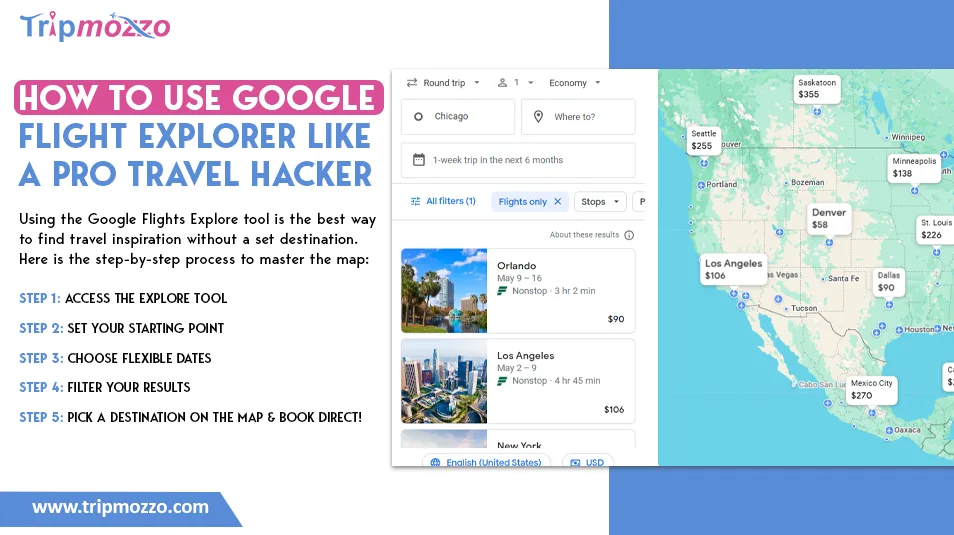
- Explore Destinations: The world offers many great destinations, but which one is most convenient from your region? Google Flight Explorer can be a savior for you in such a situation. Just enter your departure city to find flights departing from it worldwide through Google Maps.
- Follow the flights and receive notifications: When the route has been chosen, you can set a price alert and monitor the prices through Google Maps plane tracker. Once the prices are reduced to your preferred budget, the airline will send you an alert to book your flight. Once you find a route on Google, see how TripMozzo helps you book it in seconds with added support.
Moreover, you will have the same benefits as type 1 travelers. Therefore, it is not too late to begin to see what you have to offer!
Google Flights is great for searching, but to maximize savings, pair it with our strategy on how to score the best discount airfare.
What are the Features of Google Flight Explorer?
Google Flights Explorer is an efficient travel search engine that aids users in locating destinations, contrasting fees, and examining flight availability options in an interactive manner. It provides customizable search options, instant pricing information, and a map search feature; hence, it is the best search engine where travelers can be inspired, manage their budgets, and plan their trips efficiently that are affordable at the same time. The major characteristics of Google Flight Explorer are:
- Map-Based Destination Search: The Google Flights map enables you to visualize your destinations on a world map. Rather than hitting a set destination, you are able to shop several destinations and immediately visualize fares, it is ideal in unrestricted travel planning.
- Flexible Date Options: You have the ability to browse with flexible dates, like the weekends, and a one-week vacation or certain months. This finds use in showing the users the cheapest days to travel without having to search through numerous combinations of dates. Pro-Tip: Use the '6-month' view to find the absolute lowest fare for any weekend.
- Real-Time Price Insights: The tool gives real-time fare quotes and shows the low prices as well as the typical or high prices in comparison with the past trends. This assists travelers in making decisions regarding booking.
- Advanced Filters: Results can be narrowed down to:
- Budget
- Airlines
- Number of stops
- Flight duration
This guarantees extremely customized search results.
- Price Tracking Alerts: Notifications about changes in fares can be enabled. Google will also warn you about a price increase or decrease of the ticket, and you can book at the right time.
- Easy Integration with Booking: The platform also simplifies everything, as when you choose a flight, the site transfers you to the websites of the airlines or travel agencies to make a reservation.
- Inspiration for Travelers: It comes in handy, particularly when the user has no fixed destination. You can find new destinations according to budget and preferences, and thus, planning your trips is more exploratory and enjoyable.
What to Do to Book a Flight Using Google Flights Explorer?
The Google Flights Explore is a simple method of flight booking since it helps you in searching for destinations and seeing the prices and choosing the most appropriate itinerary. Though it does not actually sell you the tickets, it links you to airline/travel sites and you can easily find, compare and book flights that would fit your schedule and budget. In order to book a flight, follow the steps below:
- Open Google Flights: To begin with the search of flights, open the Google Flights webpage and switch to the Explorer (map view).
- Enter Departure City: Enter your home city. You can leave the destination open so that you can have different choices or you can type a definite place.
- Select Travel Dates: Select your travel days or you may choose flexible dates and compare prices on different days.
- Explore Destinations and Prices: An interactive map and receive destinations and fares. Select a destination and view options in the flight.
- Refine Filters: Narrow down search by using Filters (price range, airlines, number of stops and time to travel).
- Choose a Flight: Choose a flight that fits best to you based on time, price and convenience.
- Full Booking: To accomplish the process, you will use the Book button to access the site of the airline or travel partner, where you shall make the payment and book the ticket.
What are the Advantages of Google Flights Explorer?
Google Flights Explorer has various advantages that render it one of the most effective tools to plan and book air travel, particularly in the case of flexi travelers and low-end travelers.
Destination search flexibility is one of its largest strengths. It will not place you on a particular location; it will give you a chance to visit several sites on an interactive map. It is perfect when you are willing to go anywhere with a specific budget or time.
Price transparency and comparison is another major advantage. The site presents the current airfare information and indicates low, normal, or high of prices. This assists the travelers in making wise choices and not overpaying for tickets.
There is also a big strength of flexible date exploration. You can also find it very easy to compare the prices of the various days or even weekends and even months, and this will help you to find the cheapest traveling dates without having to manually search over and over again.
It also has enhanced filtering features whereby you can tailor the results in accordance with your flight criteria in terms of airlines, number of stops, number of days of travel as well as budget. This is so that you only see flights that match your preferences.
Price tracking and alerts are also a very helpful feature. With the help of it, users can track a certain route and get notifications whenever fares are altered, thus making booking convenient at the appropriate moment.
Also, google explore flights faster and easier. Its user-friendly interface is quick and saves time as opposed to the conventional flight search techniques.
Lastly, it is a travel inspiration tool. It can help to open your eyes on other places you would not have thought of by displaying destinations that are within your budget.
All in all, Google Flights Explorer is a convenient, flexible, and smart tool to use as an element of travel planning in the modern world.
Note that Google Flights might not show all regional cancellations instantly. For direct status, check our Saudia 2026 crisis update.
How to Find Cheap Flight With Google Flights Explorer?
The Google Flights Explorer is a tool that helps in simplifying the task of identifying the cheapest ticket between two destinations and two dates in real time by comparing flight prices between destinations. It allows the traveler to discover the lowest fares with the help of its map-based search and its smart filters, as well as the option to alter their dates of traveling and the best deals in the shortest time possible. The ways of finding cheap flights are as follows:
- Use Flexible Dates: Compare the prices of different days or months and find the lowest prices at the flexible dates.
- Go to Map View: Have the destination on your screen and navigate the map to find cheaper places based on your budget.
- Set a Price Limit: Use a maximum budget filter to immediately view the destinations that are affordable.
- Track Prices: Activate price tracking to be notified when the fares decrease on your route of choice.
- Filter Smartly: Select a smaller number of stops, favourite airlines or reduced time with cost and comfort considerations.
- Book at the Right Time: Consider price intelligence to decide on a decrease or an increase in fares before booking.
Conclusion
Google Flight Explorer is a must-have tool that allows the travels to find low-cost and convenient flights. Its features make the process of planning travel easier, regardless of whether you have a certain destination in mind or you need some form of inspiration to travel. It enables users to make informed choices by comparing prices in real-time and flexible date searches as well as personalized notifications and effortless integrations with booking sites. Travel planning is made easy and enjoyable since through the Google Flight Explorer, the travelers can organize their trip, explore new destinations, and get the best flight offers.