Delta Bereavement Fares 2026: The Complete Guide to Compassion Travel
The death of a loved one is one of the most challenging experiences in life, and sometimes there is need to travel instantly to attend a funeral or he...
13 Mar 2026
Read More
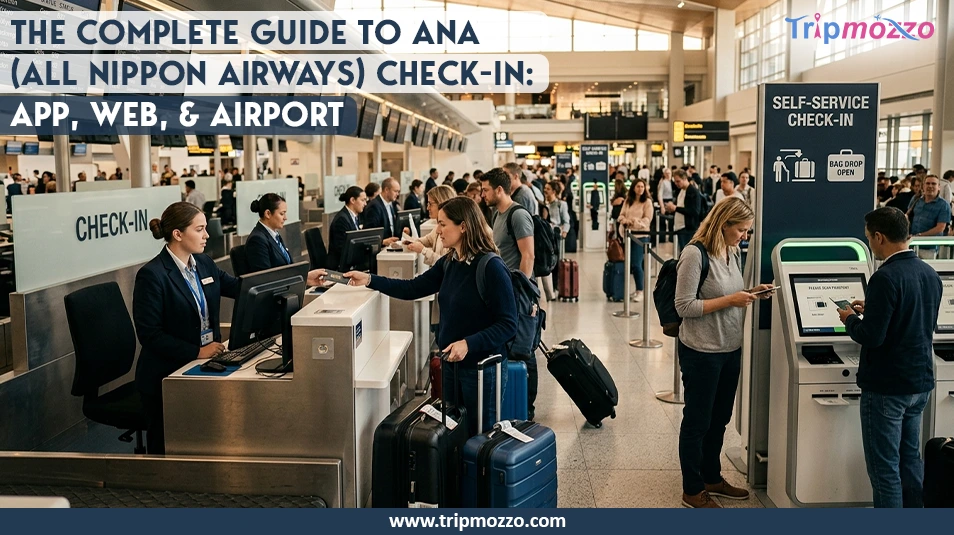
Table Of Content
Whether you are traveling to Tokyo on business or search for powder in Hokkaido, setting off your trip with All Nippon Airways (ANA) must be as smooth as their five-star cabin service. ANA is characterized by a high level of Japanese hospitality, which implies a wide range of methods to obtain a boarding pass, either through the simplicity of their mobile application or the effectiveness of self-service kiosks at the airport. These choices can make or break the experience, and a hectic run through the airport and a comfortable time in the lounge. This guide will deconstruct all the available ANA check in techniques to make sure that you do not spend so much time in the line and spend more time being inspired in Japan.
ANA provides four primary approaches to processing your check-in, so as to accommodate all the types of travelers. You can use digital comfort, fast kiosks in the airports, or a personalized counter service. All these services are simple, quick, and stress-free to manage your flight.
ANA Mobile App:
The simplest and quickest way of travelers. You are able to make your booking, reserve your seats and get your mobile boarding pass immediately. With the help of the app, there is a hassle-free experience without the necessity of printing something at the airport. Just like the Alaska Airlines boarding pass process, the ANA app allows you to save your ticket directly to your mobile wallet.
Website:
Ideal when one is traveling on a laptop or tablet. You can check your booking 24 hours prior to takeoff, select your seat and also print or download your boarding pass. Check-in online is a convenience that saves time in the airport.
Self-Service Kiosk:
Kiosks have been made available at the majority of airports where you can promptly check in, print your boarding pass, and tag your luggage. This suits passengers who are unwilling to take long queues to do on-site checks-in.
Airport Counter:
Visit the airport counter if you have oversized luggage or require special assistance. The employees will assist you in the process and make sure that you have a trouble-free beginning of your journey. This is the conventional procedure of travelers.
It is necessary to collect the required information and materials before the process of ANA flight check in. When all the arrangements are made, including the location and confirmation of the booking, as well as the travel papers and the baggage regulations, a hassle-free experience of checking in becomes a reality.
Make sure your PNR matches your ID; if there is a mistake, you must request a name change before the check-in window closes.
ANA online check-in lets you complete your check-in conveniently from home or on the go. Whether using a computer, tablet, or the ANA mobile app, you can select seats, confirm details, and get your boarding pass digitally, saving time at the airport.
The ANA web check in process is as follows:
ANA has several check-in practices that can satisfy the choice of the travelers. You choose to use your mobile phone, you choose the airport kiosk, or you choose the old-fashioned check-in desk; either way, it is convenient and efficient.
Arrival at the airport allows you to be flexible and receive direct assistance by ANA employees. You like using a self-service kiosk due to its speed or the check-in desk due to personal assistance, the airport experience will still guarantee that you have a hassle free flight due to ready boarding documents and baggage.
ANA Self-Service Kiosks
Kiosks permit fast check-in, seat reservation and printing boarding pass. All that you have to do is input your reservation information, go through screen, and drop-off your baggage when necessary. This is a rapid and convenient way of travelers who want to have minimum waiting.
Baggage Drop-off
Once a kiosk has been used or after carrying out ANA online check in, travel to the baggage drop-off counter. Present your boarding pass and valid identification to the ANA staff. ANA employees will label your bags and send it to your plane in a safe and efficient way. Passengers traveling in business class often have access to dedicated priority baggage drop-off lanes.
ANA Check-in Counter
The ANA check-in counter is ideal to the traveler who has a special request, has oversized luggage, or requires assistance. The personnel will direct you on the check-in, check the travel documents and give all required boarding passes.
ANA check-in times allow you to get yourself well in time, in areas like security, baggage drop, and boarding. Being aware of the time you should be in will eliminate stress at the last minute and will enable your trip to be smooth.
If your flight is affected by schedule changes or cancellations, arrive even earlier to speak with a representative.
Seat selection may be one of the factors that help you achieve greater comfort and convenience during your ANA journey. It does not matter whether you are flying domestic routes or long-distance trips; there are some simple measures that will make your travel experience more enjoyable.
For a deeper look at how to get the best view on any airline, read our full guide on seat selection.
ANA offers all travelers an accessible check-in system which enables them to check in without any complications. The pre-planning process which you need to complete before traveling lets you choose from all available check-in methods to start your journey which includes mobile application, website, self-service kiosk, and airport counter check-in options. The following procedures will establish an efficient system which enables passengers to check in for their domestic and international flights.
Frequently Asked Questions
How early can I check into an ANA flight?
The online check-in is available 24 hours prior to the flight, either on the site or through the app. Early check-in assists in getting seats and a boarding pass.
Is All Nippon Airways the same as ANA airlines?
The name of the company is All Nippon Airlines. The airline is popularly referred to as ANA with domestic and international air services.
How many carry-on bags are allowed in ANA?
ANA only allows one carry bag and one personal item, i.e., an item like a laptop bag or a handbag. There are different weight and size restrictions for the traveling classes.
How early should I check-in online for an international flight?
In case of international flights, make an online check-in 24 hours before the flight. This guarantees the choice of seat, document check-up, and issuing a boarding pass in time.
All Categories
Looking for detailed information on airline policies, terms & conditions, and more?
Call now to get complete guidance.
+1-888-933-0080Recent Blogs