15 Most Beautiful Cities in Spain: Where to Go Next?
Spain is a land of rich historical heritage, architectural masterpieces, and vibrant traditions. From the energetic, art-filled streets of Barcelona t...
05-03-2026
Read More
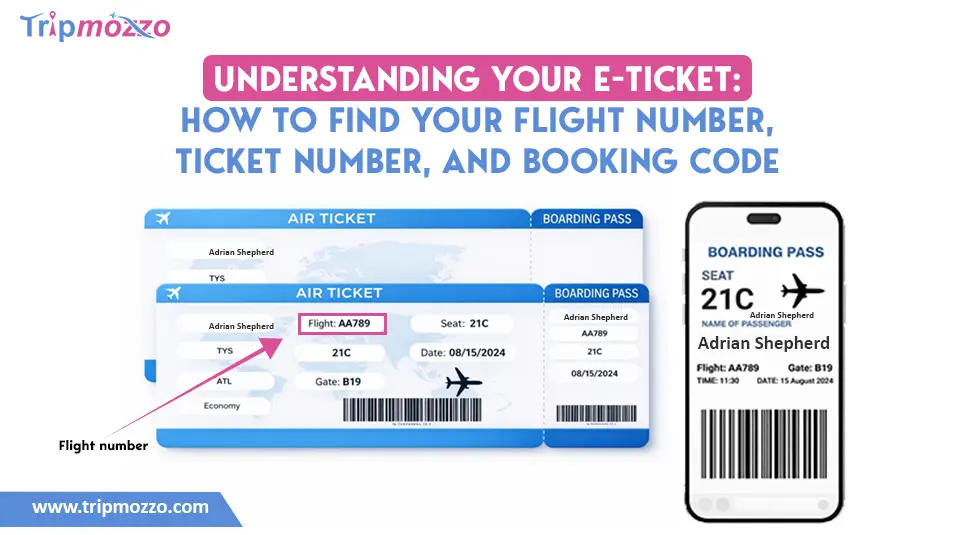
Table Of Content
It is not complicated to book a flight, however, it may feel confusing to learn about your e-ticket. There are too many numbers and codes on your confirming email and you cannot always know which one you require. Are the ticket number and the flight number the same? What is a booking code and when are you going to use it? You can save time and stress no matter whether you are checking in online, follow your flight or calling the customer support, because you know where to find the right information. This guide will also give a breakdown of the most important information on your e-ticket, and how you can find your flight number, your ticket number, and your booking code with some confidence.
An eticket (Electronic Ticket) refers to an electronic warranty of a flight purchase. Whenever you book an airplane; be it via the airlines site, a travel agency or a third-party booking site, the airlines enter the details of your reservation in their system. This record will be used as evidence that you have already paid to occupy a seat in a particular flight.
E-ticket is entirely digital in contrast to the traditional paper ticket which is issued physically. By booking, you usually get a confirmation email with the details of your travelling and some essential reference numbers.
Your e-ticket normally contains:
You should realize that your e-ticket is not the one you utilize at the gate of the airport. Rather, it serves like your reservation record on the system of the airline. The information on your e-ticket, including booking code, will be required to check-in your flight, choose seats, manage baggage, or change.
Your e-ticket is in simple terms a confirmation that you have bought a seat in a flight successfully.
Finding your flight number is easy once your booking is confirmed. If you haven't booked yet, check our guide on The Best Day to Book a Flight to save money on your next trip.
Most passengers believe that an electronic ticket is a boarding pass and a boarding pass is an e-ticket; which is not the case.
The purchase is confirmed by an e-ticket. A boarding pass will enable you to board the plane.
Having made a reservation, you get your e-ticket in real time. But, your boarding pass will not be created until you have gone through the check-in; most commonly 24 hours prior to flight (again depending on the airline).
The following is a straight-forward analysis of the differences:
|
Feature |
E-Ticket |
Boarding Pass |
|
Main Purpose |
Documents of purchase and reservation. |
Authorization to board the aircraft |
|
When Issued |
Immediately after booking |
Once the check-in (online or airport) takes place. |
|
Contains |
Itinerary, booking reference, ticket number. |
No. of seat, boarding time, gate, barcode/Qr code |
|
Stored Where |
In airline's booking system |
Electronic (mobile application/ email/ mail) or paper copy. |
|
Required to Board? |
No |
Yes |
Once you make a reservation of flight, you receive an e-ticket. Then, by checking in with your booking reference, the airline issues you with a boarding pass. You are required to present this boarding pass at the security and boarding the plane. You are not allowed to pass through security or board the aircraft without a boarding pass even with your e-ticket confirmation email.
This difference can be used to avoid being confused in the airport and to make sure that you have followed all the steps of the travelling process effectively.
One of the most crucial information on your e-ticket is your flight number. It recognizes the individual flight you are going to be on and is utilized in the tracking of flight status, displays at the airport and support. When you have ever checked your ticket and felt so lost by the numbers and codes, then never worry, your flight number is not that difficult to find when you know where to find it.
The airline assigns a combination of letters and numbers to each flight. This code informs airport personnel, customers and tracking systems specifically what aircraft and route to be on.
A flight number is more typically a short code consisting of:
For example:
In such cases the letters refer to the airline whereas the numbers relate to the individual flight route. The ticket number and the booking reference are not equal to the flight number. It is actually the shortest and it is beside your departure and arrival information.
In case you have a query how to find flight number, then there is nothing to worry about because it is visible in various locations that are easily accessible. After being aware of the common places it would be easy to spot.
Checking these places can help you easily verify your flight number, whether you are tracking flight delays, checking your gate, or calling the airline.
Your flight ticket number, or e-ticket number, is a 13-digit code on which you will be assigned upon payment completion. The ticket number is used to confirm the actual ticket that was issued in your name as opposed to the flight number which identifies the route.
This is a particularly significant figure when:
The ticket number normally starts with the three digits airline prefix in most instances and then another longer sequence of numbers. At the beginning, there are three-digit codes of each airline.
Here's where you can find it:
1. Booking Confirmation Email
Finding your ticket number is the most convenient thing when you get the confirmation email immediately after booking. Look for sections labeled:
It is normally included with your name and it is written in form of a long 13 digit number. In case you do not see it instantly, then do a search in your inbox with the keywords such as e-ticket or ticket receipt.
2. E-Ticket PDF or Receipt
In case you have a downloadable PDF itinerary or receipt in your confirmation, open it and scan the passenger details part. The ticket number can be seen next to your booking reference but longer and will be in a form of numbers.
3. Boarding Pass
Your boarding pass (digital or paper) also displays your ticket number in most occasions. It can be displayed in small writing relative to your flight number however it is normally found in the fine print section.
4. Airline Website or Mobile App
It is also possible to check your ticket number by logging into airlines site or application. Go to sections such as:
To log in to your reservation, enter your booking reference and surname. Passenger details or payment details usually include the ticket number.
5. Credit Card Statement
In other cases, transaction information on your credit card will include the ticket number that was used with your purchase. Although it is not always placed in their entirety, it can be combined with the name of the airline and payment reference.
6. Contacting Customer Support
In case you have been going all over and still fail to find your ticket number the customer care of the airline can give it. Have ready your first and last name, date of travel and booking reference number to assist them locate your reservation at short notice.
Knowledge of the location of your plane ticket number can save your time; particularly in cases of refunds, alterations, and supportive travel records. It is among the details that are of the utmost importance and are directly connected to paid reservation.
It is quite common to find that when you look through your travel documents there will be a ticket number and a booking reference printed. Although these may seem to be the same thing at first sight, they are used in quite different applications in your travelling journey.
The number of your e-ticket is to ensure that a ticket is purchased and with your name. Conversely, your booking reference is the number that enables you to view and manage your reservation on the system of the airline.
Think of it this way:
The insight into the distinction makes you apply the appropriate code at the appropriate moment.
They are most easily distinguished by their format and length.
E-Ticket Number
A long, 13-digit numeric code known as e-ticket number is issued once a ticket has been issued. It is typically all-numerical in nature and most of the time starts with a three digit airline prefix, denoting the airline in which it was issued. It is generally found in parts that are marked:
Example of an E-Ticket Number:
In the above cases, the first three digits indicate the unique code assigned to the airline, and the remaining 10 digits are the ticket number. This figure appears normally under passenger detail or payment in your confirmation e-mail or e-ticket receipt.
Booking Reference (PNR)
A booking reference is also referred to as PNR, a short alpha numeric code that is used to retrieve your reservation. The length is normally 5 to 6 characters and it consists of a combination of letters and numbers. It may also be labeled as:
Example of a Booking Reference (PNR):
The booking reference will generally appear in the top right hand part of your confirmation email, and is usually highlighted because it is the key code that the passengers will need prior to boarding the plane.
Both figures are significant, however, with different purposes.
You need your Booking Reference (PNR) to:
It is the most used code prior to departure.
You need your E-Ticket Number to:
Simply, the booking reference takes care of your reservation and the e-ticket number validates your purchased ticket.
Having both of them allows you to have a more convenient time in handling your flight or communicating with the airline.
Here's a quick and simple breakdown of the key details:
|
Detail |
What It Is |
What It Looks Like |
Why It's Important |
|
E-Ticket |
Digital proof of purchase |
Email confirmation with travel details |
Confirms you bought the ticket |
|
Boarding Pass |
Pass to enter the plane |
Shows seat, gate, boarding time, barcode |
Required to board the aircraft |
|
Flight Number |
Identifies your specific flight |
2 letters + numbers (e.g., AA123) |
Used to track and locate your flight |
|
Ticket Number |
Unique ticket ID |
13-digit number (e.g., 001-1234567890) |
Needed for refunds or ticket changes |
|
Booking Reference (PNR) |
Reservation access code |
5-6 character code (e.g., AB12CD) |
Used for check-in and managing booking |
Frequently Asked Questions
Do I need to print my e-ticket?
You do not normally require a print out e-ticket; a digital version on your phone or device does the job with most airlines. Nevertheless, it is prudent to have a copy of it on paper or as an offline PDF in case your device dies of battery or connectivity.
What if I lost my e-ticket email?
In case, your e-ticket email is lost, make sure you have checked your spam or trash box. It is also available on the airline in its Managed Booking page and the user can access it with the confirmation code and name, or you can call the customer service who will help you with it.
Is the flight code the same as the flight number?
No, the flight code and the flight number are not the same yet they are related. The flight code is made up of the 2-letter code of the airline and the flight number to identify a route with the flight number being only the numeric part of it.
Where can I find my e-ticket number?
Your e-ticket number is 13-digit number that is on your confirmation email in Passenger Receipt or Itinerary. It will also be on your printed or mobile boarding pass, or in the airline app/website in the Manage Booking section.
How do I check my e-ticket status?
To verify the status of your e-ticket, enter the airline site or the application with the help of your booking reference and your surname. Customer support is also available and can ensure whether the ticket is active, paid or is ready to check-in.
All Categories
Looking for detailed information on airline policies, terms & conditions, and more?
Call now to get complete guidance.
+1-888-933-0080Recent Articles